Fasteners
This plugin is a library of standard screws, nuts, washers and heat-set inserts. It is on by default, under Insert on the rail.
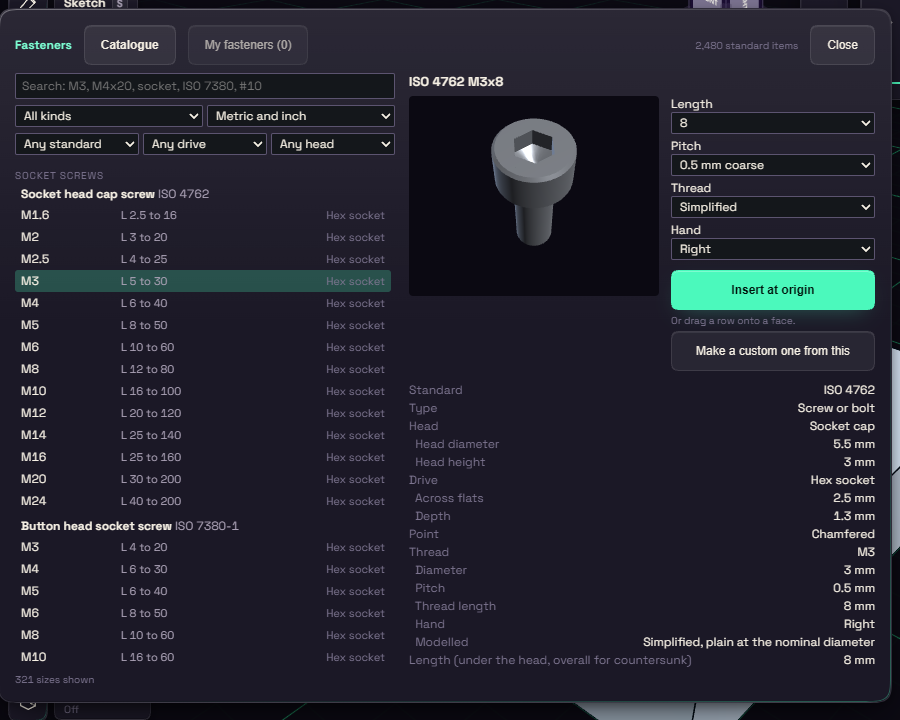
Search the Catalogue, for example M4x20 or socket, and click a row to see a preview and a table with the clearance hole and tap drill size. You can change the length, the drive and the pitch.
Thread set to Simplified is a plain cylinder that builds fast, and Modelled helix builds a real thread for close-ups.
Standard Thread
Standard Thread, under Insert, threads a round face to a standard size. Click a shaft or a bore and the panel opens on the nearest ISO, UNC or UNF size, with a line saying how far your face is from it, for example M6, 0.10 mm over tap drill. You can also pick Trapezoidal Tr and ACME.
Draw a bore at the tap drill size and the thread is cut into it. Draw it at the nominal size, set Bore drawn at to Nominal, and the thread is added inside it. Set Hand to Left and Starts up to 4 for lead screws. Print fit opens the thread by 0.2 mm all round so a printed screw turns in its nut, and you can change the amount.
Double click the thread in the history to open the panel again.
Placing fasteners
Select one flat face and press Insert on selected face to place it there. It becomes an ordinary body stored in your document. New fastener on the My fasteners tab makes your own.