Expressions
An expression is a small calculation you type where a number goes, such as width / 2. Parameter names work in a step's values in the History card, on sketch dimensions and in the Parameters dialog.
The value box of a running tool, such as Extrude, takes numbers, units and plain maths like 20 / 4 or 1 in, but no names.
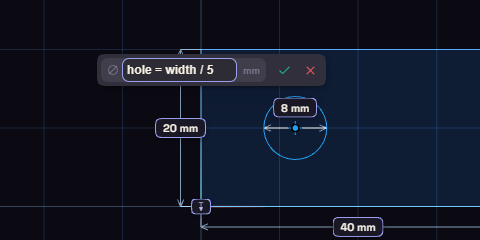
Writing one
- Put a name and an equals sign first, as in
hole = width / 5, to name the result. This works in a step's values and on sketch dimensions. - Units are mm, cm, in, deg and rad, so
1 inis 25.4 mm. - Without a unit, a length is mm and an angle is degrees.
- Use
+,-,*,/,^for powers, brackets, andPI.
Functions
| Kind | Functions |
|---|---|
| Rounding | floor, ceil, round, abs |
| Square root | sqrt |
| Angles, in degrees | sin, cos, tan, asin, acos, atan |
| Choosing | min, max, if |
Separate the values inside the brackets with a semicolon, not a comma, as in max(2; wall).
Comparisons
>, >=, <, <=, == and != give 1 when true and 0 when false. Join them with && for and, || for or, and ! for not.
So if(height > 60; 3; 2) makes a wall 3 mm on tall parts and 2 mm on short ones.