Edit a material
Click a tile in the Library and the panel under the grid shows its settings. A change shows on every part that wears the material.
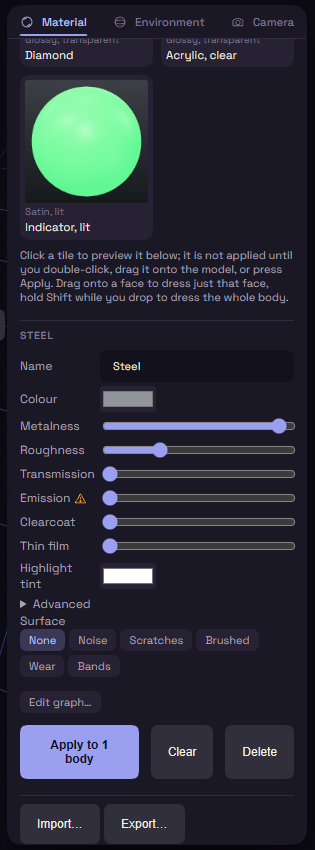
The main settings
| Setting | What it does |
|---|---|
| Name | The name on the tile. |
| Colour | The base colour. |
| Metalness | Runs from plastic to bare metal. |
| Roughness | Runs from mirror to matte. |
| Transmission | How see-through it is, high gives glass. |
| Emission | Makes the material glow. |
| Clearcoat | A shiny layer on top, like lacquer. |
| Thin film | A soap bubble shimmer. |
| Highlight tint | Colours the reflections, Clear sets them back to white. |
Advanced opens Sheen and Anisotropy, and Scatter (mm) on glass.
Emission
The warning triangle beside Emission marks a heavy effect. Every glowing body adds lights and shadows, which can slow the view on a large model, so a thin bar under the slider shows the lights filling in.
- Lights other parts appears once Emission is above zero. Untick it to glow without lighting the parts around it.
- The glow spills light only while Bloom Amount, on the Environment tab, is above zero.
Glass
A see-through material that is not metal gets Glass settings.
- Water, Glass, Crystal and Diamond set how strongly it bends light. The IOR slider sets it by number.
- Thickness is how much glass the light passes through. It is auto, measured on each body, until you move it, and Auto sets it back.
- Dispersion splits the light into rainbow colours, it shows on thick glass.
- Tint colours the glass the deeper the light goes, Tint depth sets how deep.
- Roughness frosts the glass.
Performance mode, under Viewport in Preferences, draws glass as plain see-through.
Surface
Surface adds a pattern: Noise, Scratches, Brushed, Wear or Bands. None takes it off.
- Scale sets the size of the pattern, Amount its strength and Bump how raised it looks.
- Angle turns Scratches, Brushed and Bands.
- Tint and Tint amount colour the pattern.
Edit graph… builds a pattern of your own in the node editor. While a graph is set, the pattern chips are ignored.
None of this changes the shape. For a texture that prints, use Surface Texture.