Hole patterns
Four tools on the Pattern button draw the holes themselves, so there is nothing to select first.
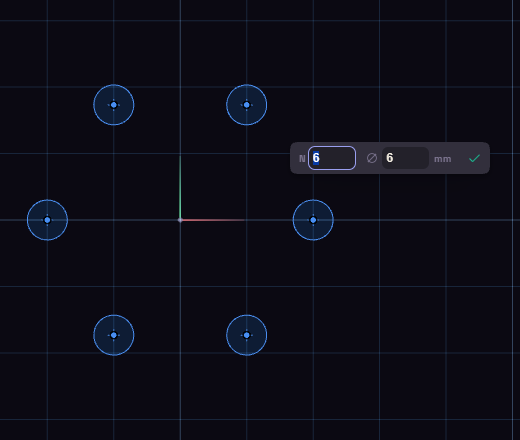
- Pick the tool and click the middle of the pattern.
- Move the mouse to set its size, and type the counts and the diameter in the boxes.
- Click again to place it.
| Tool | Lays out | Boxes | Starts at |
|---|---|---|---|
| Bolt Circle | Holes around a circle, the mouse sets the circle | N, Diameter | 6 holes of 6 mm on a 40 mm circle |
| Grid Holes | Holes in rows and columns | Nx, Ny, Diameter | 3 by 3 holes of 6 mm, 12 mm apart |
| Staggered Holes | Holes in offset rows, a hexagonal layout | Rings, Diameter | 2 rings around a centre hole, 6 mm |
| Honeycomb | The same layout with six-sided cells | Rings, Diameter | 2 rings of 12 mm cells |
Rings is how many rows of holes surround the centre one.
The holes are part of the sketch. Extrude a plate drawn around them and they are cut in the same step.
Double-click a hole to reopen its pattern and change it.