The Items card
The Items card lists what is in the document. Ctrl+Alt+S shows or hides it.
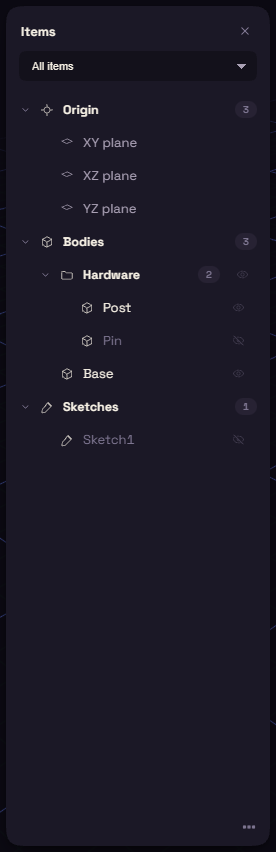
Origin, Bodies and Sketches are always there. Planes, Datums, Joints and Mechanisms appear once you have one. The list at the top shows only one kind: All items, Bodies, Planes and axes, or Sketches.
Rows
- Click selects a row, Ctrl+click adds one, and Shift+click takes a run.
- Click a plane under Origin to start a sketch on it.
- Double-click renames a body or edits a sketch.
- Right-click a body for Move to, Material, Visibility, Rename and Delete.
Hiding
- Click a row's eye to hide or show it, or drag across several eyes.
- Alt+click an eye to show only that row, and Alt+click it again to bring the rest back.
- H hides the selected bodies, and Shift+H shows them all.
A hidden body is left out of any join, cut or intersect, unless the step names it as a target.
Elements
An element is a folder for bodies.
- Right-click the Bodies heading and choose New element.
- Drag bodies onto the element. Dropping one body onto another puts both in a new element.
Clicking an element selects every body inside it, and its eye hides or shows them all.