Extra Parameters
This plugin gives your parameters sliders, groups, saved sets of values and warnings. It is on by default.
Once you have a parameter, a Parameters section appears in the Items card. A slider commits when you let go, so one drag is one undo step.
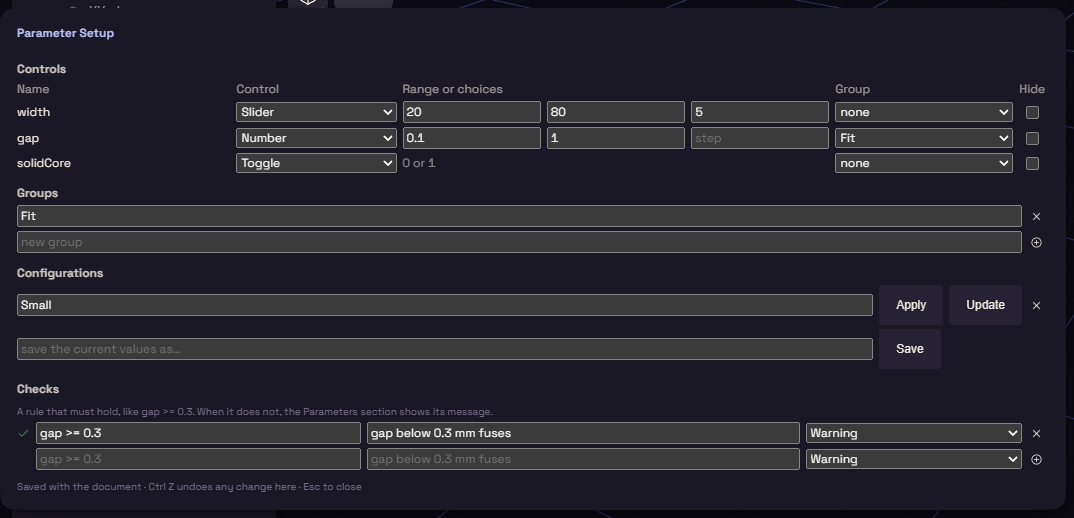
Parameter Setup
Open it from the button on the Parameters section header, or from Edit, Parameter Setup. It has four parts.
| Part | What it does |
|---|---|
| Controls | Gives each parameter a Number, Slider, Toggle or Choice, a range or choices, a group, and Hide |
| Groups | Headings to file parameters under |
| Configurations | Named sets of values, such as "Small". Apply sets them back, Update saves the values of now |
| Checks | A rule and a message, such as gap >= 0.3 with "gap below 0.3 mm fuses", as a Warning or an Error |
Once you save a configuration, pick it from the Configuration list at the top of the Parameters section. A failed check shows its message there.
An optional part
A toggle can switch a step on and off.
- Add a parameter such as
solidCoreand give it a Toggle. - Right click the step on the timeline and choose Add condition.
- Type
solidCorein its Active when field.
The step builds while the toggle is on and is skipped while it is off.