Preferences
Preferences holds the settings that belong to you, not to a document. Open it from Edit, Preferences…, or press Ctrl+,. Most changes apply at once.
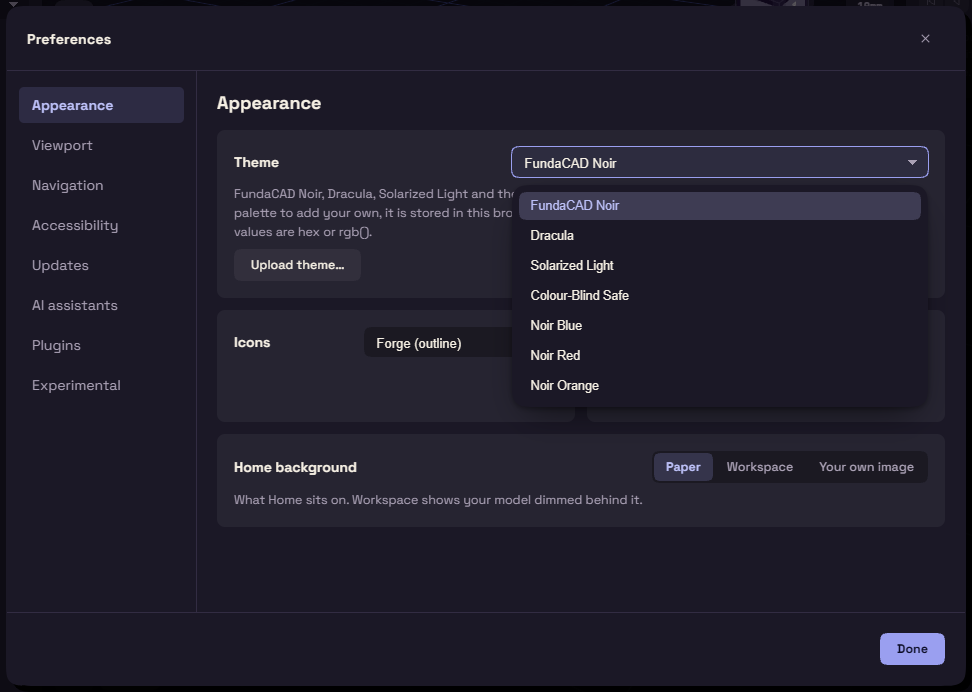
Pages
| Page | What it sets |
|---|---|
| Appearance | Theme, Icons, Units, Home background |
| Viewport | Reflections, Background, Environment brightness, Tangent edges, Bloom, Path tracer, Performance mode, Potato mode |
| Navigation | Smoothing, Orbit pivot, Orbit inertia, Scrolling, Two-finger scroll, Classic camera |
| Accessibility | Animations, Hover delay |
| Updates | Check for updates automatically, and how often |
| AI assistants | See Connect an AI assistant |
| Plugins | See Plugins |
| Experimental | The limits FundaCAD keeps for stability |
Themes
Theme colours the whole app. These ship with FundaCAD:
- FundaCAD Noir, the default, and its tints Noir Blue, Noir Red and Noir Orange
- Dracula
- Solarized Light
- Colour-Blind Safe, its colours stay apart for every common kind of colour blindness, and its Y axis is yellow
Upload theme… adds your own from a JSON file of colour tokens, such as --bg and --accent. Remove takes it away again.
Good to know
- Units changes the display only, geometry is always stored in millimetres.
- Tangent edges sets how the line along a smooth fillet shows: Show, Faint or Hide.
- Path tracer picks where Path traced runs: Auto, Native or WebGPU. High quality denoise downloads a better denoiser for Native.
- Performance mode and Potato mode lighten the view on a slow computer. Potato mode includes Performance mode.
- Orbit pivot is what a drag turns the view about: Under cursor, Origin or Selection.
- Classic camera brings back the earlier camera, after a restart.
- Animations off makes every move instant. It follows the system's reduce motion setting until you change it.
- Hover delay is how long the pointer rests on a part before one face lights up instead of the whole part.
- Updates checks Daily unless you pick Every launch or Weekly. Turned off, nothing is sent until you use Help, Check for Updates….
Experimental
Experimental raises the limits FundaCAD keeps for stability: the HDR environment size, and the samples, bounces, firefly clamp, trace resolution, picture size and triangle count of Path traced.
These can make FundaCAD unstable or crash it. Reset to defaults puts every one back.