Hole
Hole, under Modify on the rail, drills holes into a flat face, ready for a screw.
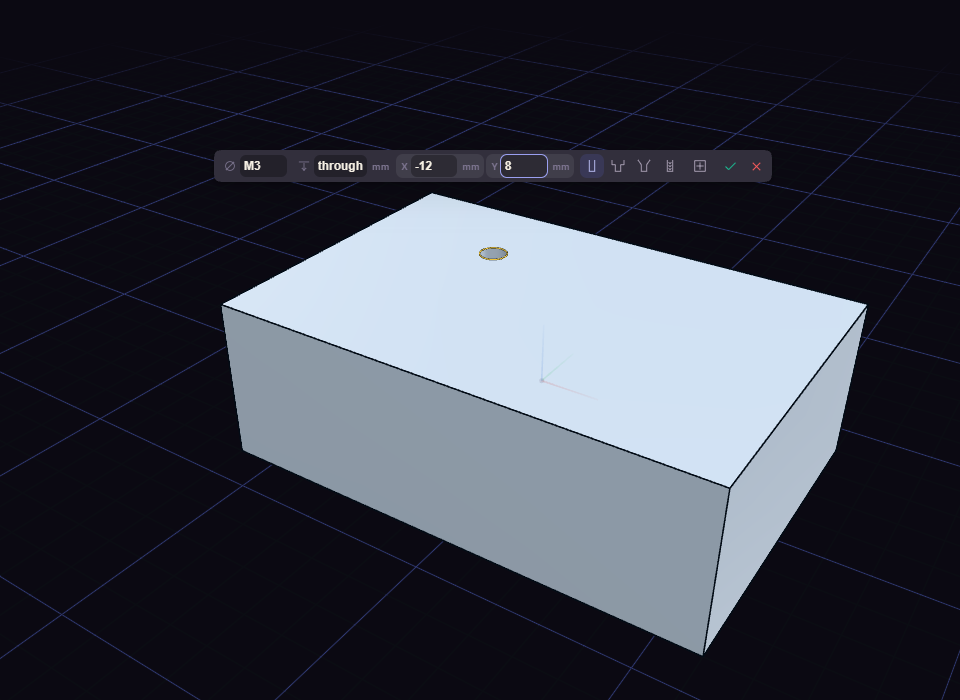
- Click Hole, then click a flat face where the hole goes.
- Click the face again for each further hole. Click a hole to remove it, or drag it to move it.
- Set the hole in the value box, then press Enter to make them all, or Esc to cancel.
The value box has these parts:
- Size: M2 to M20, or type a diameter for a hole of your own size.
- Depth: a length, or
throughto drill all the way, the default. - X and Y: where the first hole sits, measured from the centre of the face. The button beside them moves it back to the centre.
- Type: Simple, Counterbore, Countersink or Insert. Insert sizes the hole for a brass heat-set insert and cannot go through.
The step's rows in the History card hold the rest. Standard picks Clearance, Tap drill or Custom, and Fit picks Close, Normal or Loose for a clearance hole.